BM3331 / BC5203
This dataset comes from a study by JCU PhD student, Jia Zhang. The goal of that study was to understand the evolutionary origins of “super” tough corals inhabiting reefs in the Kimberley region of Western Australia. To do this, genetic variants of the coral, Acropora digitifera, were analysed based on samples from the Kimberley, Rowley Shoals and Ashmore Reef. The overall hypothesis of the study is that corals in the Kimberley should harbour genetic differences from offshore reefs (Rowley Shoals, Ashmore Reef) that allow them to survive extremes of temperature, long intertidal exposure times, and highly variable turbidity.
The work was published in 2022 in the journal Molecular Biology and Evolution. Note that the analyses in this study are very extensive and many involve specialist population genetics knowledge which we have not covered in this subject. You are by no means expected to reproduce these analyses. You do not need a background in genetics to complete this assignment but if you do have such a background you should feel free to use your knowledge to extend the scope of work to include whatever analyses you feel would be appropriate.
Data Setup
The data for this assignment is located at the path /pvol/data/coralvar on the class rstudio server. Run the following commands to create a symbolic link to this in the raw_data directory of your assignment
cd raw_data
ln -s /pvol/data/coralvar .
The following files are present within the coralvar data directory;
| File Name | Purpose |
|---|---|
metadata.tsv |
A tab separated values file with information on the sampling locations for each coral colony in the study |
*.bam |
Sequence alignment data. Each .bam file represents paired-end Illumina sequencing reads that have been aligned to the Acropora digitifera genome for a single coral colony. Sample IDs are encoded in the filenames of these *.bam files. |
GCA_014634065.1_Adig_2.0_genomic.fna |
The full genomic sequence of Acropora digitifera |
genes.gff |
Gene models for the Acropora digitifera genome |
western_australia |
Folder containing map data for the WA coastline |
Key software tools
- bcftools for variant calling and filtering
- vcftools for variant filtering and some genetic analyses
- plink2 for calculating genetic PCA and Fst
- IGV for visualising overlap of genes with SNPs
- bedtools for finding genes that overlap with SNPs
awkfor filtering and transforming tables of values
Visualising Sample Locations
There are many excellent options for making publication-quality maps in R. The simple features package is particularly easy to use as it provides extensions to ggplot2 for map layers. The code below provides a bare bones illustration of how you might use this package to plot the sampling locations from this study.
library(sf)
library(tidyverse)

wa_coast <- st_read("raw_data/coralvar/western_australia/",layer = "cstwacd_l") %>%
  filter(FEAT_CODE=="coastline")

wa_coast_cropped <- st_crop(wa_coast, xmin = 113.8, ymin = -22.59, xmax = 128.51, ymax = -6.49)

projcrs <- "+proj=longlat +datum=WGS84 +no_defs +ellps=WGS84 +towgs84=0,0,0"

site_summaries <- read_tsv("raw_data/coralvar/metadata.tsv") %>%
  group_by(site_name,lat,lon) %>%
  summarise(n_samples=n())

sites_sf <- st_as_sf(site_summaries,coords = c("lon", "lat"),crs = projcrs)

ggplot() +
  geom_sf(data=wa_coast_cropped) +
  geom_sf(data=sites_sf, lwd=1,aes(color=site_name,size=n_samples)) +
  theme_bw()
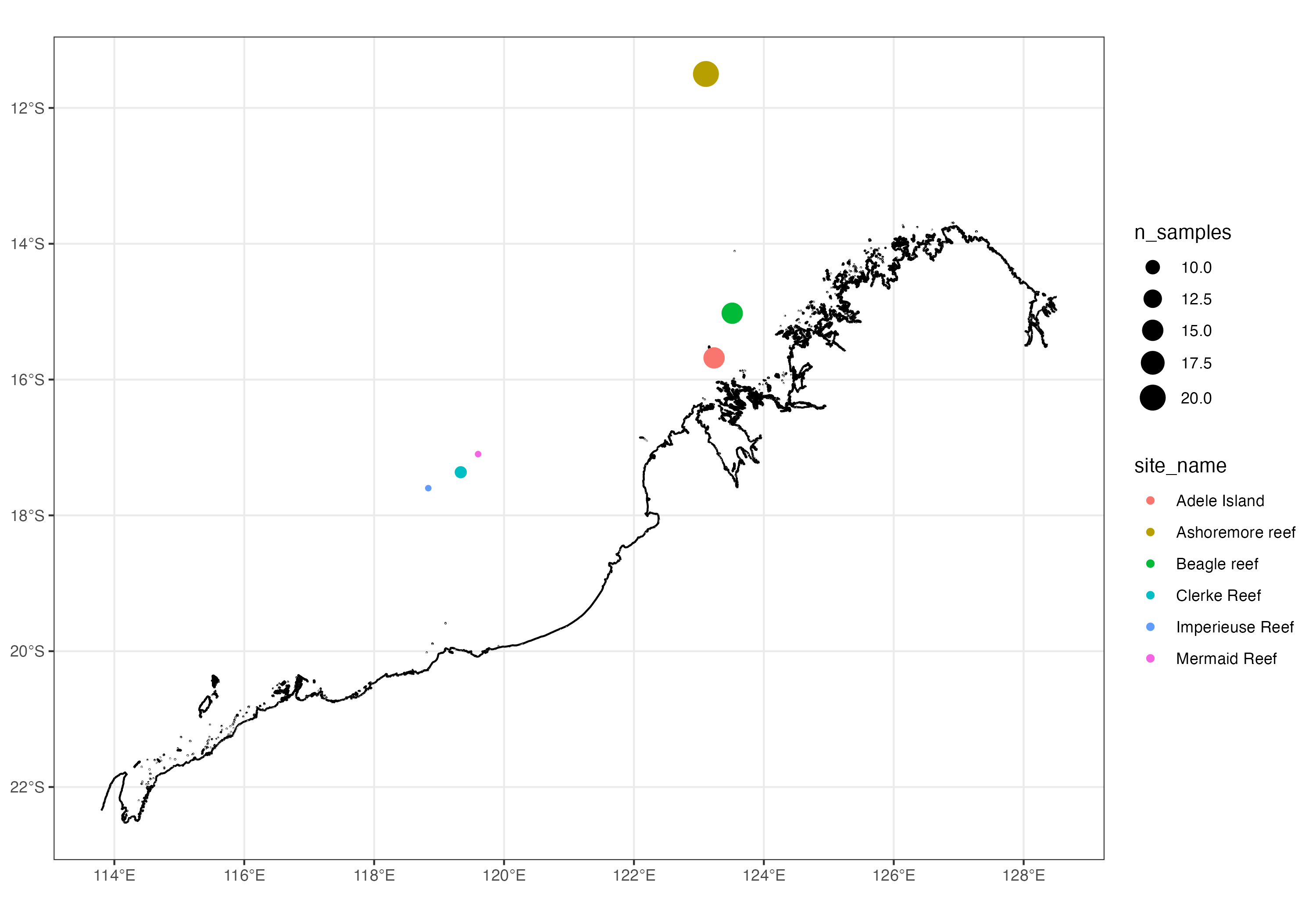
Map of the Western Australian coastline showing sampling locations used in this study
Germline Variant Calling
The full dataset for this paper is very large as it represents the whole genomes of 75 coral colonies, each of which was sequenced to a depth of around 20x. To make things tractable for this assignment the bam files have been trimmed down to include only reads that overlap a few thousand selected variable sites across the genome. These reads also cover many nearby variants, so you will still find plenty of variants when you call them. Nevertheless, even with this trimmed data a vast array of analyses are possible.
Regardless of what else you plan to do with this data you will almost certainly want to begin by performing germline variant calling. This topic was covered in Matt Field’s lectures and you will have encountered it in a human context in the variants coding assignment.
Rather than using the GATK variant caller we will use the bcftools variant caller as this is faster and simpler. To call variants you will need the reference genome, GCA_014634065.1_Adig_2.0_genomic.fna and bam files with reads aligned to this genome. Both are in raw_data/coralvar. Variant calling is done in two steps, which are joined with a pipe (|). The first step, bcftools mpileup, summarises the evidence for variants at each position in the genome (ie how the reads are piled up against the genome). The second step, bcftools call, uses this summary to actually call the variants.
Do not run these commands interactively. Instead, save the slurm script below as call_variants.slurm in the top level of your project and include it in the github repository for your assignment.
#!/bin/sh
#SBATCH --time=60
#SBATCH --ntasks=1 --cpus-per-task=1 --mem=2gb

bcftools mpileup -q 20 -Q 20 -Ou \
  -f raw_data/coralvar/GCA_014634065.1_Adig_2.0_genomic.fna \
  raw_data/coralvar/*.bam | \
  bcftools call -v -m -Ov -o cache/coral.vcf -
Submit the script from the top level of your project with sbatch call_variants.slurm. Slurm runs the job in the directory you submit it from, so the paths in the script are relative to your project folder. The job takes about 15 minutes. You can check on it with squeue, and any messages or errors will be written to a file called slurm-<jobid>.out.
Note that the files in raw_data/coralvar are read-only, so don’t try to write any outputs there. Put intermediate files like coral.vcf in cache/ instead.
Basic Variant Filtering
After performing variant calling you should have a vcf file with about 200,000 variants. After the filtering steps below about 90,000 will remain. You can count the number of variants in the file as follows;
bcftools view -H cache/coral.vcf | wc -l
Many of these variants will be low quality (possibly false positives) that we would like to remove from our analyses. Variant filtering is a complex topic that we have not covered fully in this subject. For the purposes of this assignment just perform some basic cleanup. We do this in a series of steps. At each step we produce a new vcf file and will check it to see how many variants were retained
- Remove variants supported by just a single alternate allele (minor allele count of less than 2)
vcftools --vcf coral.vcf --mac 2 --stdout --recode --recode-INFO-all > coral1.vcf - Remove sites with very low or very high read depth. In this dataset we have 75 samples and would like to exclude any sites where the mean depth is 10x or less (total depth <750) and where the depth is greater than 33x (>2500). Both low and high depth sites can be a sign of poor mapping quality.
bcftools filter -e 'DP<750 || DP>2500' coral1.vcf > coral2.vcf - Remove sites with more than 10% missing genotypes and keep only biallelic SNPs
vcftools --vcf coral2.vcf --max-missing 0.9 --min-alleles 2 --max-alleles 2 --remove-indels --stdout --recode --recode-INFO-all > coral3.vcf
Suggested Analyses
Once you have completed variant calling you should have a vcf file. This can be used to perform many analyses using programs installed on our rstudio server such as vcftools and plink.
Principal Components Analysis (PCA). A genetic PCA using the vcf file can be used to reveal distinct groupings or clusters of samples (AKA genetic structure). A simple way to perform the PCA is using plink2 as follows
plink2 --vcf coral3.vcf --out adig --pca --allow-extra-chr
After running this command you will have a pair of output files *.eigenvec and *.eigenval. The eigenvec file contains the position of each sample within the multidimensional space of the PCA. Here you are most likely only interested in plotting samples in 2 dimensional space (PC1 vs PC2). The eigenval file has one eigenvalue for each of the top 10 PC axes, and these can be used to calculate the amount of variation explained by each axis.
Note: The eigenvalues are not proportions, and dividing them by the sum of the 10 values in the file will badly overestimate the variation explained, because the file leaves out all the other axes. plink2 runs the PCA on a relationship matrix between samples, and the eigenvalues for all of its axes add up to approximately the number of samples (75). To get the proportion of variation explained by an axis, divide its eigenvalue by 75. Expect each axis to explain only a few percent of the variation. This is normal for genetic data.
  eigenval <- read_table("adig.eigenval", col_names = "eigenval") %>%
    mutate(PC = row_number(), percent_explained = eigenval / 75 * 100)
To colour your PCA plot by sampling location you will need to join the eigenvec file to metadata.tsv. Note: The sample names in the eigenvec file don’t match the ID column in metadata.tsv. The names in the vcf file (and therefore in all plink2 outputs) come from the bam files and have extra text on the end, for example AI_1_001_S102_L004 or AI_1_008_merged. The matching ID in the metadata is just the first three parts of the name (AI_1_001 and AI_1_008). You can extract this before joining, like this
  metadata <- read_tsv("raw_data/coralvar/metadata.tsv")

  pca <- read_table("adig.eigenvec") %>%
    mutate(ID = str_extract(`#IID`, "^[^_]+_[^_]+_[^_]+")) %>%
    left_join(metadata, by = "ID")
Pairwise Fst for each variant site. Fst measures the degree to which frequencies of alleles differ between groups of individuals (populations). In your PCA (step 1) you should be able to identify genetically distinct groups of individuals. Now you can calculate the Fst between each pair of groups. Essentially Fst measures the degree to which individual genomic loci have diverged between populations. A value of 1.0 indicates that a variant is completely fixed in one population and absent in another (ie total differentiation) whereas a value of 0 indicates no differentiation (equal variant frequencies in the two populations). We expect some differentiation to occur over time in all sites due to neutral processes such as genetic drift. If natural selection has acted to increase the frequency of specific alleles in certain populations we may see extremely high or “outlying” values of Fst at specific sites.
To prepare data for calculating Fst with plink you will need to prepare a text file in which each individual sample is listed in the first column and the grouping to which that sample is assigned is listed in the second column. For example the top few lines of your file should look something like this
  #IID  site
  AI_1_001_S102_L004	inshore
  AI_1_008_merged	inshore
  AI_1_021_S97_L004	inshore
Note: metadata.tsv lists six sampling sites but does not say how these sites group into larger regions, so you will need to work out the groupings yourself. Use your map to see which sites are close to each other, and your PCA to see which samples cluster together. Explain how you chose your groupings in your report.
Assuming you have you named this file populations.txt you can now calculate Fst for each pair of populations and for every variant locus as follows;
plink2 --fst site report-variants --pheno populations.txt --vcf coral3.vcf --allow-extra-chr
This will produce several output files as follows;
| File Name | Purpose |
|---|---|
| plink2.pop1.pop2.fst.var | Fst values for individual SNPs between pop1 and pop2. There should be 3 such files if you had three genetic groupings |
| plink2.fst.summary | Average Fst value (across all sites) for each pair of populations. |
Examine the Fst results carefully. Is there one population that seems more divergent than the others? Do you see any SNPs with an unusually high value of Fst? If so, what can you say about the genomic region(s) where these high values are found? Do they overlap with known genes?
To investigate these questions you should load Fst values into R and explore the distribution of values. To find out whether SNPs overlap with genes you can load both SNPs and gene models into a genome browser such as IGV or use bedtools.
Note: The per-SNP Fst files contain two kinds of values that can catch you out.
nanvalues. Several thousand SNPs in each file have an Fst ofnan. These are SNPs where both populations in the pair have the same single allele, so Fst can’t be calculated. When you read the files into R, usena = c("", "nan")so that these become missing values (NA), and rememberna.rm = TRUEwhen you calculate summaries such asmean(). If you filter the files withawkinstead, you must exclude these lines explicitly (eg$5 != "nan" && $5 > 0.5). Otherwiseawkcomparesnanas text and everynanline will pass the filter.- Negative values. Between 40% and 50% of the values are negative. This is expected and doesn’t mean something has gone wrong.
plink2uses Hudson’s estimator of Fst, which corrects for the number of samples in each population. At SNPs with no real differentiation the estimates scatter around zero, so many come out slightly below zero. Read negative values as no differentiation, but leave them in your data, because removing them (or setting them to zero) would make averages too high.
fst <- read_tsv("plink2.pop1.pop2.fst.var", na = c("", "nan"))